

TL;DR
Short version: the field is a ration, the ration is measured in a unit nobody displays, and most listings overspend it on words that were already working. |
It is not 250 characters.
That single confusion accounts for most of what goes wrong in the backend search terms field, because it is invisible. You type, the box accepts it, nothing warns you, and some proportion of what you entered was never going to be counted the way you assumed.
Where the Misunderstanding Comes From
Amazon presents five fields labeled Search Terms 1 through 5. The natural reading is five separate allowances. The actual behavior is that they are combined into a single 250-byte pool, so filling all five does not multiply anything. It divides one budget into five boxes.
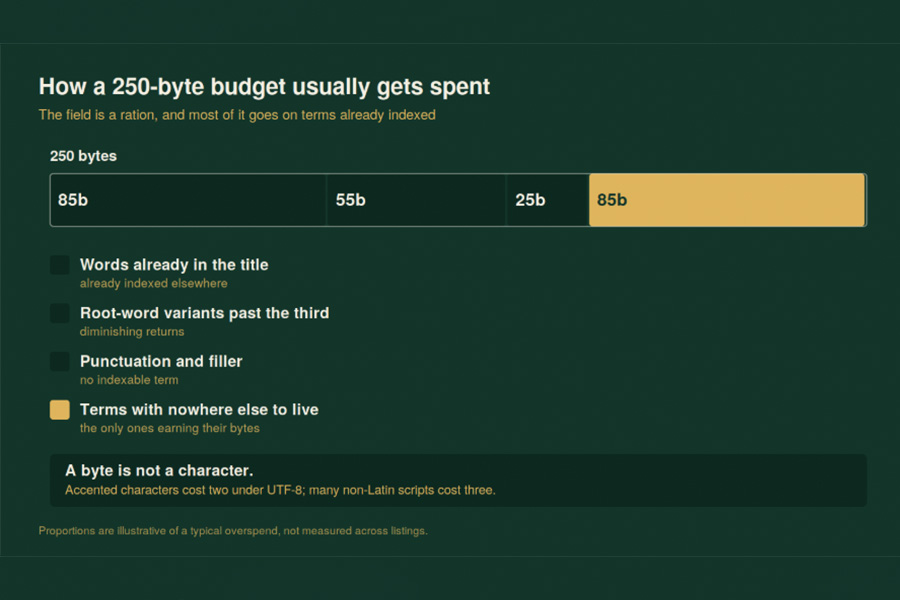
The budget is stated in bytes. A byte is not a character. For plain English text the two happen to coincide, which is why sellers working in a single Latin-script language rarely notice anything wrong.
Under UTF-8, each character is a sequence of one to four bytes, and only ASCII characters get away with a single one. Everything outside that range costs more. An accented Latin character typically costs two. Characters from non-Latin scripts commonly cost three.
The practical consequence is that a German, Spanish, Japanese or Arabic seller has materially less room than an English one, in a field that displays no counter and gives no warning. Two sellers can type visually identical amounts of text and one of them silently overruns.
For scale, “wireless earbuds” costs 18 bytes. At that rate 250 bytes holds roughly a dozen or so short English phrases, and considerably fewer if any of them carry accents.
What the Budget Should Not Be Spent On
Because the field is hidden, it attracts everything a seller could not fit elsewhere. That instinct is exactly backwards. Hidden space is scarcer than visible space, so it should carry only terms that have nowhere else to go.
Four categories waste it reliably.
Words already in your title. If the title reads “Noise-Cancelling Wireless Earbuds with 24-Hour Battery,” then earbuds, wireless, noise, cancelling and battery are indexed. Repeating them in the backend buys nothing and costs bytes.
Root-word variants. Sellers commonly enter a root ten different ways. Two or three of the most commonly typed variants is the sensible ceiling; beyond that you are paying for diminishing returns in a fixed budget.
Punctuation and filler. Commas, hyphens and connective words consume bytes without adding indexable terms.
Other people’s brand names. This one is not a waste of budget, it is a legal exposure, and it is dealt with separately below.
The full rule set, including the three scenarios where hidden terms genuinely earn their space, is worked through in this guide to Amazon backend search terms, which also covers the build workflow from three keyword sources.
If you want the encoding rule from the source rather than from a seller blog, the Unicode Consortium’s UTF-8 and BOM FAQ is the primary reference, and it states the one-to-four-byte range plainly. It is worth five minutes for anyone listing in more than one language, because it is the only place the cost of your own alphabet is spelled out.
The Brand-Name Problem
Putting a competitor’s brand name in your backend field is a recurring tactic and a bad one. It is invisible to shoppers, which is precisely what makes sellers comfortable with it, and it is visible to the brand owner’s monitoring, which is what makes it a problem.
Registered marks are searchable for free. The USPTO’s trademark search system lets anyone check whether a term is registered and, critically, for which class of goods. That last part is where sellers get caught: a word can be freely usable in one class and registered in the one you are selling into.
The exposure is not theoretical and the consequence is not a rejected edit. It is a complaint against the listing, and in repeat cases against the account.
Budget the Field Like a Budget
Treating 250 bytes as an allocation rather than a dumping ground produces a simple working method.
| Step | Action | Why |
| 1 | List candidate terms from three sources | Native search data, competitor terms, customer language |
| 2 | Strike anything already in the title or bullets | Already indexed, zero marginal value |
| 3 | Strike registered brand terms | Legal exposure, not a byte question |
| 4 | Rank the remainder by relevance | The field is small, so ranking decides what survives |
| 5 | Fill to the byte limit, counting non-Latin characters properly | The unit is bytes, not keystrokes |
The order matters. Striking before ranking means you are ranking a shorter list, and the terms that survive are the ones with genuinely nowhere else to live.
Test One Thing at a Time
The reason most sellers have no idea whether their backend terms work is that they change all of them at once.
Change one term. Wait seven days. Check whether the term indexes. Record the date and the result. In practice indexing has been observed within about five days, so a seven-day window is a reasonable cadence that allows for variance without stalling the work.
This is slow, and the slowness is the feature. A single-variable test over a month produces four reliable findings. Rewriting the whole field monthly produces twelve months of guessing, which is what most listings have.
The Number That Should Be on Your Checklist
There is no target number of backend keywords, and any advice that names one is inventing it. The only meaningful target is using the 250 bytes efficiently, which means every byte is carrying a term that is relevant, not already indexed elsewhere, and not somebody else’s property.
Count your current field. Not the characters, the bytes. If you are working in any language with accented characters, the number will be higher than you expect, and some of what you believed was in there may not be.